
By Web ToolBox Store, Senior SEO & AEO Expert
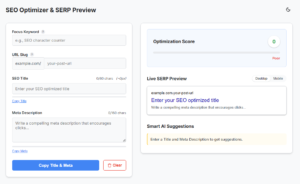
In the rapidly evolving landscape of Search Engine Optimization (SEO) and Answer Engine Optimization (AEO), some fundamentals remain absolutely critical. While AI overviews and zero-click searches dominate the headlines, the humble meta title and description still serve as your website’s front door. They are the decisive factors in whether a user clicks your link or scrolls past it to a competitor.
But here is the reality check for webmasters and SEOs: managing these tags on a five-page website is easy. Managing them across a 500-page or 5,000-page site? That requires a robust system for Bulk SEO Auditing & Sitewide Checks.
If you are still manually trying to check the meta description of a page one by one, you are wasting valuable time. Today, we are diving into why bulk auditing your meta tags is essential, how to optimize them for both traditional search and AI engines, and the ultimate tool you need to get the job done.
Pixel-Perfect SERP Simulator
Stop guessing how your sitewide meta tags will render. Audit your titles and descriptions with pixel-perfect accuracy to maximize your organic click-through rates.
Launch the SimulatorWhy Sitewide Meta Tag Audits Are Crucial for SEO & AEO
Google’s search algorithms are constantly evolving, and the way snippets are generated is no exception. According to the official Google Search Central documentation on snippets, search engines may programmatically rewrite titles and descriptions if they don’t accurately represent a page’s content or fit the display window. Utilizing a simulator ensures your manual entries are so well-optimized that Google has no reason to replace them with automated text.
Search engines and Answer Engines (like ChatGPT, Claude, and Google’s AI Overviews) rely heavily on your meta data to understand page context. A missing, truncated, or poorly written meta description can severely hurt your Click-Through Rate (CTR).
When you check website meta description tags across your entire domain, you are looking for three main culprits:
Missing Tags: Pages missing descriptions force search engines to pull random (often irrelevant) text from your page.
Duplicate Tags: Copy-pasting descriptions across multiple pages confuses search engines and dilutes your topical authority.
Pixel Length Violations: Characters don’t matter as much as pixels. A description might be 150 characters, but if it’s filled with wide letters like “W” and “M,” it will still get truncated on the SERP.
To maintain a healthy site architecture, you must regularly check site meta description health as part of your routine technical SEO audit.
| Audit Method | Time Required | Pixel Accuracy | Scalability |
|---|---|---|---|
| Manual Browser Checks | Hours / Days | Low (Character-based) | Poor |
| Standard SEO Plugins | Moderate | Medium (Estimates) | Moderate |
| Premium SERP Simulator | Minutes | High (Exact Pixels) | Excellent |
The Problem with Manual Checks
The transition from character limits to pixel-based measurements is backed by significant industry data. Comprehensive research from Moz on SERP display limits confirms that Google generally displays the first 500 to 600 pixels of a title. Because characters like “I” and “W” occupy vastly different horizontal space, relying solely on a character counter is a technical oversight that often leads to unexpected truncation on high-resolution displays.
Let’s say you published a new batch of 50 articles. You need to check website meta description of page by page to ensure they render correctly on mobile and desktop search results.
Doing this manually by inspecting source code or using a basic browser extension is incredibly inefficient. You need a reliable site meta description checker that allows you to visualize exactly how your snippets will appear to real users before Google even indexes them.
Pixel-Perfect SERP Simulator
Stop guessing how your sitewide meta tags will render. Audit your titles and descriptions with pixel-perfect accuracy to maximize your organic click-through rates.
Launch the SimulatorIntroducing Your Secret Weapon: The Premium SERP Simulator
As webmasters, we need tools that bridge the gap between technical data and visual rendering. That is why I highly recommend integrating a dedicated website title and meta description checker into your workflow.
If you want to stop guessing and start optimizing, you need to use the Premium SERP Simulator: The Ultimate Meta Title and Description Checker.
Why This Tool is a Game-Changer for Bulk SEO Auditing:
Pixel-Perfect Accuracy: Instead of relying on outdated character counts, this tool measures the actual pixel width of your titles and descriptions, ensuring zero truncation on Google SERPs.
Bulk Capabilities: When you need a reliable bulk meta description checker, this tool allows you to simulate and refine multiple snippets, saving you hours of manual auditing.
Desktop & Mobile Previews: See exactly how your site appears across different devices. What looks great on a desktop might be cut off on a smartphone.
AEO Ready: Crafting concise, intent-driven descriptions is vital for Answer Engine Optimization. This visualizer helps you front-load the most critical information so AI bots can easily parse and feature your content.
Best Practices for Sitewide Meta Tag Optimization in 2026
Technical SEO is not just about rankings; it is about adhering to global web standards. The W3C (World Wide Web Consortium) emphasizes that the
<title>element is the most important component for both search engines and web accessibility. A well-crafted title serves as a primary label for users with visual impairments using screen readers, making sitewide audits a vital part of both SEO and inclusive web design.
Once you have your bulk meta description checker ready, keep these senior-level SEO/AEO strategies in mind:
Front-Load Your Keywords: Both traditional algorithms and AI models assign more weight to the beginning of your text. Put your primary keyword in the first 50 pixels of your title and the first 100 pixels of your description.
Write for the Click (and the Bot): Your meta description is ad copy. Include a clear Call to Action (CTA) like “Learn more,” “Discover how,” or “Get the ultimate guide.”
Align with Search Intent: If the page is a transactional product page, mention price, shipping, or discounts in the description. If it’s informational, promise a direct answer to the user’s query.
Regularly Schedule Sitewide Audits: Don’t treat meta tags as a “set it and forget it” task. Use your site meta description checker every quarter to identify pages whose CTR has dropped and refresh their metadata.
Frequently Asked Questions
Why is a bulk meta description checker necessary?
When managing a growing website, checking the meta description of a page individually becomes unscalable. A bulk checker allows webmasters to audit sitewide tags simultaneously, identifying missing, duplicate, or truncated descriptions that harm your overall search visibility.
Why measure pixels instead of character counts?
Search engine results pages allocate a specific pixel width for titles and descriptions, not a character limit. Wider characters like "W" take up more space than narrow ones like "i". Measuring by pixels ensures your snippets are never abruptly cut off on desktop or mobile screens.
Final Thoughts
The days of guessing whether your titles and descriptions will look good on Google are over. By implementing regular bulk SEO audits and utilizing precise, pixel-based simulators, you can dominate the SERPs, increase your organic CTR, and send stronger relevance signals to AI search engines.
Stop leaving your organic traffic to chance. Optimize your site’s front door today.
👉 Ready to audit your site like a pro? Try the Premium SERP Simulator: The Ultimate Meta Title and Description Checker now and ensure your snippets are pixel-perfect every single time.